Five quick calculators to price repairs, check profit, and reserve for taxes—then run the whole shop with the Auto Shop CFO.
Build a repair estimate that actually covers your costs and pays you.
🔒 Runs entirely in your browser — nothing you enter is sent or stored.
What you add on top of parts cost to cover sourcing & handling.
Extra buffer on top of cost + labor for profit and the unexpected.
About This Quote Builder
A repair estimate that only covers your parts and labor is really just a break-even price — it pays your bills but not you. This calculator adds a profit buffer on top of your true costs, so every quote you hand a customer already has your margin built in before you ever pick up a wrench.
Parts markup and labor are kept separate for a reason: parts markup covers the time and risk of sourcing, ordering, and stocking components, while labor is priced on the hours you'll actually spend on the vehicle. Blending the two into one number makes it easy to underprice labor-heavy jobs and overprice parts-heavy ones.
A common question shop owners search for is “how much should I charge for a repair?” — the honest answer is: your real cost, plus enough margin to cover the jobs that run long, the comebacks, and the slow weeks. A 15% buffer is a starting point, not a rule; shops with more overhead or more warranty comebacks often need 20-25%.
Tip: run last month's five biggest repair orders back through this calculator with your actual parts and hours. If your real invoiced total was lower than what this tool recommends, you were underpricing those jobs without knowing it.
See what a finished repair order actually made you, after every cost.
🔒 Runs entirely in your browser — nothing you enter is sent or stored.
What you paid out in wages for this job, not what you billed.
Sublet, shop supplies, payment fees, warranty/rework, etc.
About This Job Profit Calculator
Winning the sale isn't the same as making money. This calculator answers the question every shop owner should ask after closing out a repair order: after parts, labor, and the small stuff, did this job actually pay?
“Other costs” matters more than it looks — sublet work, shop supplies, credit card fees, and warranty comebacks quietly eat into margin on jobs that looked profitable on the invoice. Leaving them out is the most common reason a shop's real profit runs lower than what the owner expects.
Margin, not just dollar profit, is what tells you whether a job type is worth repeating. A $400 profit on a $2,000 transmission job (20% margin) is a different result than $400 profit on a $500 brake job (80% margin) — the second is a far better use of your bay time.
If a job comes back under 15% margin, don't just shrug it off — go back to what you quoted with the Quote Builder above and see where the estimate and reality diverged.
Work out the minimum you need to charge per billable hour.
🔒 Runs entirely in your browser — nothing you enter is sent or stored.
Monthly overhead
Billable time
Hours actually billed to customers, not total hours worked.
About This Labor Rate Calculator
Most shops set their labor rate by asking what the shop down the street charges. That tells you what the market will bear, not whether your own rate covers your own bills. This calculator works backward from your overhead and desired profit to your true minimum rate.
Billable hours — not hours the shop is open — is the number that matters here. A tech who's at the shop 40 hours a week but only billing 26 of them (the rest lost to admin, waiting on parts, and comebacks) means your real rate needs to be higher than a naive “overhead ÷ 40 hours” calculation would suggest.
Overhead creeps. Rent, insurance, equipment payments, and software subscriptions are easy to forget individually but add up to a meaningful chunk of what every billable hour needs to cover. Reviewing this list once a quarter catches rate drift before it becomes a real problem.
This number is your floor, not your target. Once you know the minimum, you can decide — based on your specialty, reputation, and local market — how much above it you actually want to charge.
Estimate self-employment tax and income tax separately, not just a flat guess.
🔒 Runs entirely in your browser — nothing you enter is sent or stored.
About This Tax Reserve Calculator
Self-employment tax catches a lot of shop owners off guard because it's stacked on top of regular income tax — you're paying both the employee and employer share of Social Security and Medicare. This calculator splits the two out so you can see exactly where the money is going.
The reason to reserve by pay period (weekly or monthly) rather than waiting until tax time is simple: the money already isn't yours the day you earn it. Moving your estimated reserve to a separate account the same day you deposit revenue keeps a good month from turning into an ugly April.
Parts and COGS reduce your taxable profit, which is why they're subtracted before the tax math runs — a shop with high parts volume and thin labor margin often owes less tax per dollar of revenue than a labor-heavy shop, even at the same top-line number.
This is a planning estimate, not a substitute for a tax professional who knows your entity type, state, and deductions. Think of it as a “don't spend this” flag, not a filed return.
See how many months your savings would cover you with no income.
🔒 Runs entirely in your browser — nothing you enter is sent or stored.
The full amount you have saved right now — not a monthly figure.
About This Business Runway Calculator
Runway answers a simple but uncomfortable question: if the bays went quiet tomorrow, how long could you keep the doors open and pay yourself? Most shop owners have never actually run this number.
This calculator intentionally uses your personal savings and personal expenses, not the shop's bank account — the goal is to know how long you could hold on personally while you rebuild the schedule, not how long the business entity survives on paper.
Seasonal shops (heavy AC repair in summer, less traffic in winter, or vice versa depending on region) should run this calculation right before their historically slowest month, not right after a good one — that's when the real number matters.
A short runway isn't a reason to panic; it's a reason to build a small buffer intentionally, the same way you'd stock a slow-moving part before you actually need it.
A single spreadsheet to log every repair order—parts, labor, and profit per job. Enter your email and we'll send it over instantly.
🔧 AUTO SHOP CFO
The free tools above answer one question at a time. The paid workbook gives you ongoing control—every repair order, every month, in one place.
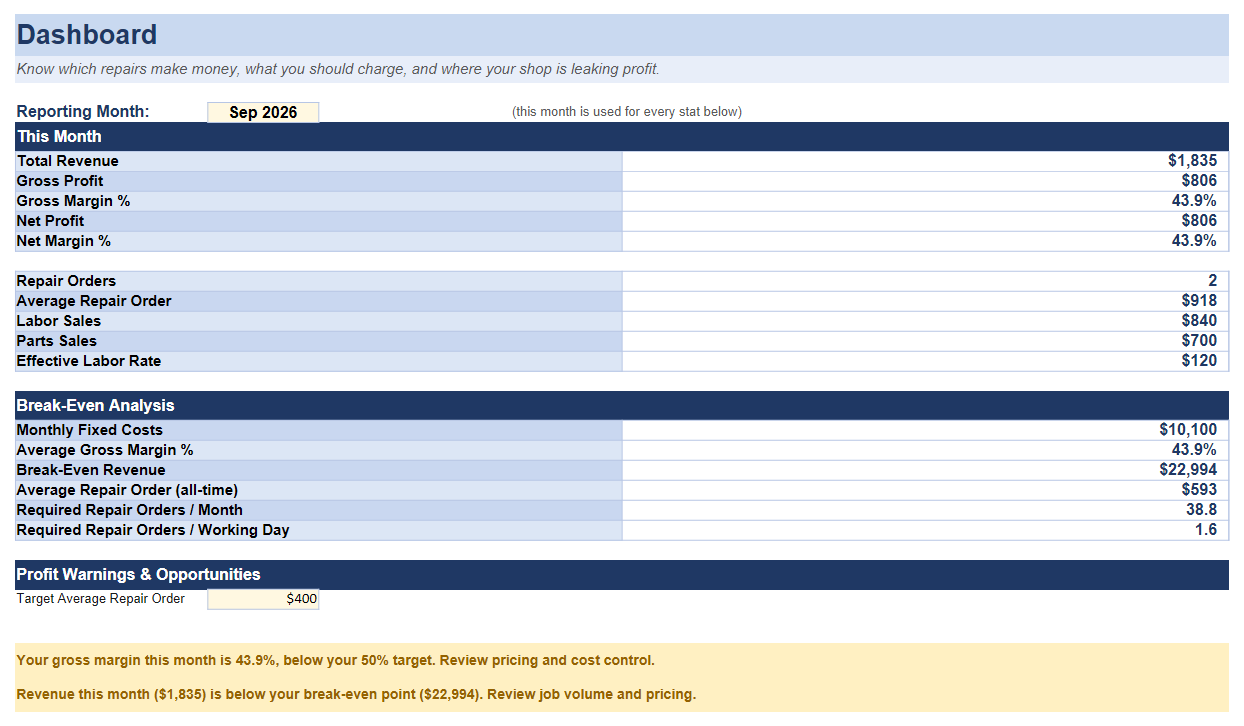

Answer one question, once, then you're back to guessing next week.
Every repair order, every dollar, tracked automatically—so the answer is always current.
Includes:
No. The tax reserve calculator combines a standard self-employment tax estimate (15.3%) with the federal bracket you select, for planning purposes only. It doesn't account for deductions, credits, state tax, or entity type. Always confirm your actual tax obligations with a licensed tax professional.
The tax reserve calculator assumes sole proprietor or single-member LLC self-employment tax rules. If you're taxed as an S-corp or have employees on payroll, your actual tax picture is different—talk to your accountant.
Yes — these calculators run entirely in your browser. Nothing you type here is sent anywhere or stored.
More Free Tools
Free calculators for other trades from Mundusflow.